Behind the screens
How I designed a nutrition app that helps me gain weight, not lose it
Long story short
01The problem
Trackers made me do the work
Every app I tried still had me digging through food catalogs and guessing which version matched, especially for meals with more than one ingredient.
02What I did
An app that logs meals for me
Meet Marea: describe a meal or scan its barcode, and AI works out the nutrition. I designed it, and Claude Code built it.
03The outcome
10+ lb
gained back after going pescatarian, in record time, with the coach guiding what to eat.
Data-backed wins
1 week
from first prompt to a working app
13.7K
lines of code, none typed by me
Every day
I still log with it to keep my habits on track
The full story
Skip to the app ↓Timeline
1 week
Team
- Design & product me
- Engineering Claude
Why build it myself?
This year I went pescatarian and lost about 10 pounds I didn’t want to lose. Gaining weight is hard for me, so I needed to track macros against a muscle-building goal and count my workouts toward what I still had to eat.
MyFitnessPal and similar apps made logging feel like data entry. Search for salmon and you get dozens of versions to filter through, Costco or Trader Joe’s. I wanted AI to do that work: describe the meal or scan the barcode, and get the numbers.
There was a second reason. I design for banking, an industry that’s been slow to adopt AI, while friends at fintechs build with it every day. I wanted to learn it hands-on and stay current.
So I built my own and called it Marea, Spanish for “tide”.
How I built it without writing code
- 1
Start with the goal
I told Claude what I wanted to build and why. It pointed me to Claude Code and laid out the steps.
- 2
Break it into small steps
Setup meant Terminal commands, API keys and plenty of errors. Asking for one small step at a time is what got me through.
- 3
Iterate like a design review
I tested every feature as it landed and kept refining the flows and the look until the app felt like mine.
- 4
Never touch the code
I described, reviewed and redirected. Claude Code wrote all 13,700 lines.
Decisions I made along the way
Accuracy over flash
Photo logging looks impressive, but a picture of rice can’t tell whether it was cooked in oil. The photo option is still there, but I rely on describing a meal or scanning its barcode.
A web app, not the App Store
Marea is just for me, so instead of paying to publish it, I turned it into a web app that lives on my home screen with the same features.
Free over paid
Claude suggested a paid nutrition service. I asked for a free alternative instead, so Marea runs on free nutrition data with no subscription.
Workouts change the target
Calories I burn are added to the day’s budget, so I always know how much more I need to eat.
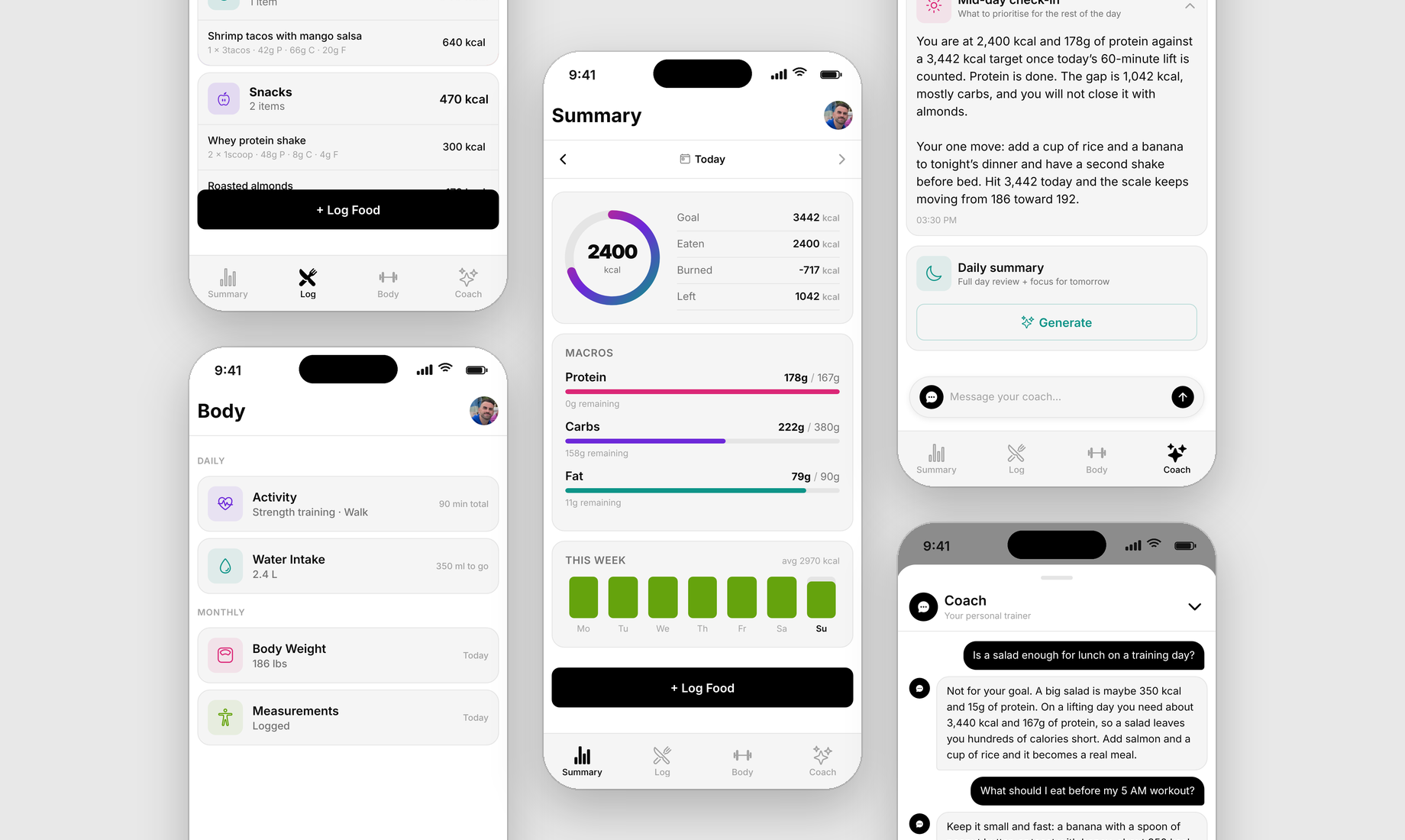
What Marea does
Summary
What I’ve eaten, burned and have left. Tap a macro to see the foods behind it, and see which days this week I hit my goal.
Log
Breakfast, lunch, dinner and snacks. Describe a meal by voice or text, scan a barcode, reuse saved meals and recipes, or quick-add foods I eat often.
Body
Water, workouts, body weight and monthly measurements.
Coach
My goals and target physique, a midday check-in, an end-of-day summary, and a chat for any nutrition question. It’s told to be brutally honest and always use my real numbers.
Built with
Expo and React Native for the app · Supabase for sign-in and sync · Google Gemini for meal descriptions and coaching · USDA and Open Food Facts for nutrition data · Cloudflare for hosting and the AI connection
What I learned along the way
Real products show what screens hide
Using a working app exposed gaps static mockups never would: how you get from one step to the next, and what happens after you enter something.
Small steps beat big asks
When setup got overwhelming, breaking it into one task at a time turned errors into progress.
Say it another way
When Claude misunderstood, rephrasing usually fixed it, though a few dead ends cost time and tokens.
Small things add up
A salad isn’t a meal for me, and the snacks I never thought twice about added a lot of calories I didn’t need. Now I eat for the weight I want.
Knowing isn’t the same as seeing
I’m a certified personal trainer and took a nutrition course, but seeing my own numbers every day is what made the logic finally click.
AI belongs in banking design
This showed me how much faster banking teams could move with AI, and I bring that thinking to my work in banking.
Next project